
Simple to say that Indexing is essential for filtering/sorting/grouping a table having more number of rows. But the real challenge is choosing the right column for index.
Before that, Let’s have a quick understand of Index & how it is helpful in filtering the rows:
So selecting the right column is important.
In General, A column having more distinct values is good for Index.
Rule of thumb :
Index Selectivity Formulae = (Count of distinct values/Number of Rows) * 100%
If Selectivity is > 8 % it can be considered for Index
In other simple words, when you filter a query by using an indexed column, you should get less than 15% of rows.
For example, if you need to filter an 10,000 records table based on Gender (the 2 distinct values will be Male / Female)
Selectivity = 2 / 10000 * 100% = 0.002% and so it should not be used for index.

As we can see cursor needs to scan more rows in the Index table & then map with the prime table. This has no advantage than scanning entire rows of the Primary table.
Also this selectivity formulae cannot be followed simply for all. We should consider the volume of data for each distinct value.
For example, an Indian Ecommerce store having 500 customers from more than 50 countries. Based on our rule, it is eligible. But when you analyze the data, if 400 customers are from India alone, then there is no need for Index.
So with selectivity formulae, you have to judge based on the possible volume of data.
In Part 2, We can see how to pick the columns for Multiple Column Index.
Before that, Let’s have a quick understand of Index & how it is helpful in filtering the rows:
- Index can be classified as Clustered Index & Non-Clustered/Secondary Index.
- A Table will have only one Clustered Index, but can have multiple Secondary Index.
- In MySQL, Primary Key is considered as a Clustered Index.
- Rows are sorted & stored in the table based on this Clustered Index. The row values are stored closed to the Clustered Index column.
- A Secondary Index will be maintained in a separate dictionary with that Indexed column (sorted) & the primary key column (to link the clustered index). If Primary Key index is long, secondary index use more space.
- A example of Secondary Index :
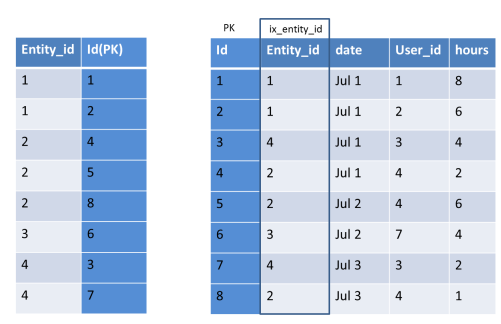
- When we filter rows based on indexed column, instead of scanning all rows, only the needed rows will be scanned. (as the indexed values will be sorted)
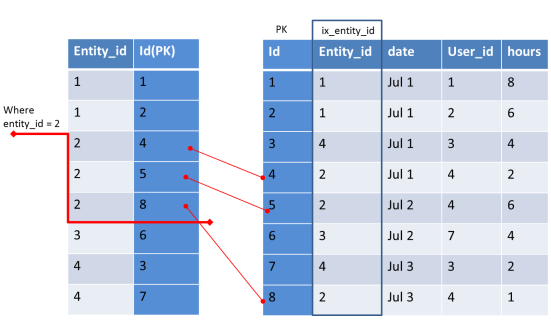
So selecting the right column is important.
In General, A column having more distinct values is good for Index.
Rule of thumb :
Index Selectivity Formulae = (Count of distinct values/Number of Rows) * 100%
If Selectivity is > 8 % it can be considered for Index
In other simple words, when you filter a query by using an indexed column, you should get less than 15% of rows.
For example, if you need to filter an 10,000 records table based on Gender (the 2 distinct values will be Male / Female)
Selectivity = 2 / 10000 * 100% = 0.002% and so it should not be used for index.
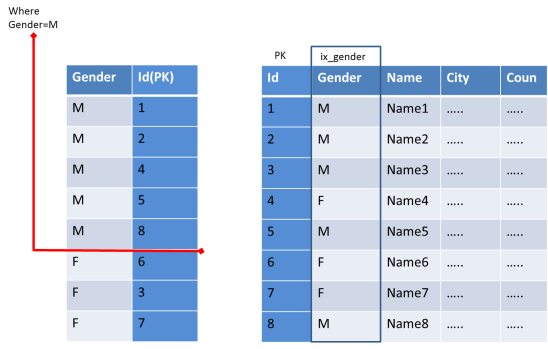
As we can see cursor needs to scan more rows in the Index table & then map with the prime table. This has no advantage than scanning entire rows of the Primary table.
Also this selectivity formulae cannot be followed simply for all. We should consider the volume of data for each distinct value.
For example, an Indian Ecommerce store having 500 customers from more than 50 countries. Based on our rule, it is eligible. But when you analyze the data, if 400 customers are from India alone, then there is no need for Index.
So with selectivity formulae, you have to judge based on the possible volume of data.
In Part 2, We can see how to pick the columns for Multiple Column Index.


 Posts
Posts

