
In Part 1, we got some picture on choosing the column for index.
Here we are going to see the factors to be considered for Multicolumn index.
When to use Multiple Column Index ?
Consider a sales table with following columns:
id, company_id, sales_date, client_id , amount, remarks
If we filter the sales table based on any one field like
…from sales where company_id = 1;
…from sales where sales_date = ’2014-07-31′;
…from sales where client_id = 12 ;
it is better to have separate index for each field than multiple index.
But when multiple columns are used in filter like
…from sales where company_id = 1 and sales_date=’2014-07-31′;
…from sales where company_id = 1 and sales_date=’2014-07-31′ and client_id=12;
we should consider multiple column index than single column index for each field.
The index can be created as (company_id, sales_date, client_id)
One smart thing in multiple column index is, all the columns defined in index need not to be used in Filter column.
The index(company_id, sales_date, client_id) can support the following queries too
…from sales where company_id = 1
…from sales where company_id = 1 and sales_date=’2014-07-31′;
How Multiple Index are stored ?
Here Index will be maintained in a dictionary with the specified columns + Primary key.
The values will be sorted based on the specified column order.

Choosing columns is an Art
The columns should be chosen cleverly & defined in the particular order aiming the result.
The queries should also be build considering the index. If ignored, then index will also ignore us.
For example a Index defined for (col1,col2,col3)
@ Where Condition
@ Group By
@ Order By
Factors to be considered in Multiple Index Column Order
Make sure the first column should not be used for range operations. In that case, further columns will have no effect.
From the above example: SELECT * FROM tbl_name WHERE col1 > val1 AND col2 = val2; (INDEX NOT USED)
Also use the columns first, whose filter results has less rows than filtering other rows.
For example, You want to filter a School students table by Subject and Class.
Select count(*) from students where subject = ‘ENGLISH’ and class=’IV’ ;
Let’s check each filter possible result count:
Select count(*) from students where subject = ‘ENGLISH’ ;
Result: 469
Select count(*) from students where class = ‘IV’ ;
Result: 29
So when we filter using class first, we will filter most of the records. Obviously, less scanning of records for further column(s) filter in index.
Thus the order of column index should be (class, subject)
Hope this helps to under the use of Multiple Column Index and also the factors to be considered in creating them.
Here we are going to see the factors to be considered for Multicolumn index.
When to use Multiple Column Index ?
Consider a sales table with following columns:
id, company_id, sales_date, client_id , amount, remarks
If we filter the sales table based on any one field like
…from sales where company_id = 1;
…from sales where sales_date = ’2014-07-31′;
…from sales where client_id = 12 ;
it is better to have separate index for each field than multiple index.
But when multiple columns are used in filter like
…from sales where company_id = 1 and sales_date=’2014-07-31′;
…from sales where company_id = 1 and sales_date=’2014-07-31′ and client_id=12;
we should consider multiple column index than single column index for each field.
The index can be created as (company_id, sales_date, client_id)
One smart thing in multiple column index is, all the columns defined in index need not to be used in Filter column.
The index(company_id, sales_date, client_id) can support the following queries too
…from sales where company_id = 1
…from sales where company_id = 1 and sales_date=’2014-07-31′;
How Multiple Index are stored ?
Here Index will be maintained in a dictionary with the specified columns + Primary key.
The values will be sorted based on the specified column order.
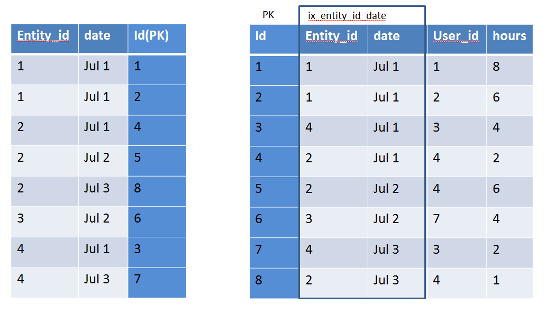
Choosing columns is an Art
The columns should be chosen cleverly & defined in the particular order aiming the result.
The queries should also be build considering the index. If ignored, then index will also ignore us.
For example a Index defined for (col1,col2,col3)
@ Where Condition
- SELECT * FROM tbl_name WHERE col1 = val1 AND col2 = val2 AND col3 = val3; (INDEX USED)
- SELECT * FROM tbl_name WHERE col1 = val1 AND col2 = val2; (INDEX USED)
- SELECT * FROM tbl_name WHERE col1 = val1 (INDEX USED)
- SELECT * FROM tbl_name WHERE col2 = val2; (INDEX NOT USED)
- SELECT * FROM tbl_name WHERE col2 = val2 AND col3 = val3; (INDEX NOT USED)
- SELECT * FROM tbl_name WHERE col1 = val1 AND col2 > val2; (INDEX USED)
- SELECT * FROM tbl_name WHERE col1 > val1 AND col2 = val2; (INDEX NOT USED)
- SELECT * FROM tbl_other JOIN tbl_name on tbl_other.col2 = tbl_name.col2; (INDEX NOT USED)
- SELECT * FROM tbl_other JOIN tbl_name on tbl_other.col2 = tbl_name.col2 where tbl_name.col1 = val1; (INDEX USED)
@ Group By
- SELECT * FROM tbl_name group by col1, col2, col3; (INDEX USED)
- SELECT * FROM tbl_name group by col1, col2; (INDEX USED)
- SELECT * FROM tbl_name group by col1; (INDEX USED)
- SELECT * FROM tbl_name group by col1, col2,col3,col4; (INDEX NOT USED)
- SELECT * FROM tbl_name group by col2, col3; (INDEX NOT USED)
- SELECT DISTINCT col1, col2 FROM tbl_name; (INDEX USED)
- SELECT col1, MIN(col2) FROM tbl_name GROUP BY col1; (INDEX USED)
- SELECT col1, col2 FROM tbl_name WHERE col1 < const GROUP BY col1, col2; (INDEX USED)
- SELECT MAX(col3), MIN(col3), col1, col2 FROM tbl_name WHERE col2 > const GROUP BY col1, col2; (INDEX USED)
- SELECT * FROM tbl_name WHERE col1 < const GROUP BY col1, col2; (INDEX USED)
- SELECT * FROM tbl_name WHERE col2 < const GROUP BY col1, col3; (INDEX NOT USED)
- SELECT * FROM tbl_name WHERE col3 = const GROUP BY col1, col2; (INDEX USED)
- SELECT * FROM tbl_name WHERE col1 = const GROUP BY col2, col3; (INDEX USED)
- SELECT * FROM tbl_name WHERE col2 = const GROUP BY col1, col3; (INDEX USED)
@ Order By
- SELECT * FROM tbl_name ORDER BY col1, col2, col3, … ; (INDEX USED)
- SELECT * FROM tbl_name WHERE col1 = constant ORDER BY col2, col3; (INDEX USED)
- SELECT * FROM tbl_name WHERE col1 = constant ORDER BY col3, col2; (INDEX NOT USED)
- SELECT * FROM tbl_name ORDER BY col1, col2 ; (INDEX USED)
- SELECT * FROM tbl_name ORDER BY col2, col3, … ; (INDEX NOT USED)
- SELECT * FROM tbl_name ORDER BY col1, col3; (INDEX NOT USED)
- SELECT * FROM tbl_name WHERE col2 = constant ORDER BY col1, col3; (INDEX USED)
- SELECT * FROM tbl_name ORDER BY col1 DESC, col2 DESC; (INDEX USED)
- SELECT * FROM tbl_name WHERE col1 = constant ORDER BY col2 DESC; (INDEX NOT USED)
- SELECT * FROM tbl_name WHERE col1 = constant ORDER BY col1 DESC, col2 DESC; (INDEX USED)
- SELECT * FROM tbl_name WHERE col1 > val1 ORDER BY col1 ASC; (INDEX USED)
- SELECT * FROM tbl_name WHERE col1 < val1 ORDER BY col1 DESC; (INDEX USED)
- SELECT * FROM tbl_name WHERE col1 = val1 AND col2 > val2 ORDER BY col2; (INDEX USED)
Factors to be considered in Multiple Index Column Order
Make sure the first column should not be used for range operations. In that case, further columns will have no effect.
From the above example: SELECT * FROM tbl_name WHERE col1 > val1 AND col2 = val2; (INDEX NOT USED)
Also use the columns first, whose filter results has less rows than filtering other rows.
For example, You want to filter a School students table by Subject and Class.
Select count(*) from students where subject = ‘ENGLISH’ and class=’IV’ ;
Let’s check each filter possible result count:
Select count(*) from students where subject = ‘ENGLISH’ ;
Result: 469
Select count(*) from students where class = ‘IV’ ;
Result: 29
So when we filter using class first, we will filter most of the records. Obviously, less scanning of records for further column(s) filter in index.
Thus the order of column index should be (class, subject)
Hope this helps to under the use of Multiple Column Index and also the factors to be considered in creating them.


 Posts
Posts

