Thursday, November 20, 2014

Cassandra - A Linear Scalable Database for Output Messenger

After getting positive feedback from Output Messenger v1.0 customers, we are planning to press the accelerator further to make sure all features in instant messaging world is available in our Output Messenger too.

One of the request from customers is a hosted version. Our existing architecture is designed as a self-hosted version & scalable to support 10,000 users inside a company. But for a cloud based hosted version, obviously needs more scalability & availability.

While designing the needed changes in existing design, need to choose a scalable database to store the chat message history. As there will be more write operations, we preferred Log Structured Merge tree (LSM Tree) & started reviewing few databases.
The top in our review list was "Cassandra"

Apache Cassandra - A linear scalable database designed for high performance best in class Write & Read, with scalability & availability.
Cassandra's database is designed as a master less architecture with fully distributed & therefore no single-point-of-failure (SPOF).

The Write record gets replicated across multiple nodes & so there is no master / slave node.  Even it gets replicated across multiple nodes, the client will wait for only one node confirmation.
blog_cassandra1


Also by having LSM Tree structure, the insert data will be kept in memory, later it will be appended in disk & merged. So, Write operations will be fast without waiting for any index ordering.
Another important advantage with Cassandra is their column indexes.
Let's see how a Composite-keyed index (primary key + column index(s)) may help for our instant messenger chat history logs.
Assume we are having the chat history table structure as below:
 create table chatmessages (
  chatroomid int,
  senton timestamp,
  sender varchar,
  message varchar,
  PRIMARY KEY (chatroomid, senton)
   );
 
While querying
select * from chatmessages


chatroomidsentonfrommessage
124112569537329ramHi
124112569537411laxmanHi Ram,How ar..
124112569537523ramFine..I need a..
124112569537758laxmanYes. Sure. I can …
 
It seems to be normal database result/operations. We may assume data is also stored in this format.
But, the interesting part is Cassandra stores in its own way.
Of the 4 columns declared in create table, will result as 2 columns while insert operation.
row_key : chatroomid (first key declared in primary key)
column_name_1: senton + from  (from value will be stored in this column)
column_name_2: senton + message (message value will be stored in this column)
ie, The first of Primary key will be the row key. Subsequent primary key column values will be the prefix of the non-primary columns.


As below our data look in Cassandra's storage model:
chatroomid12569537329 from12569537329 message12569537411 from12569537411 message
1241ramHilaxmanHi Ram,H..


The columns keep on growing with messages.
While fetching chat room messages for a particular period, our select query will be:
select * from chatmessages where chatroomid=1241 and senton >= '2014-11-13 00:00:00+0200' AND senton <= '2014-11-20 23:59:00+0200'

We have to always use chatroomid in filter as it is the main row key.
Also  Cassandra has CQL (Cassandra Query Language) much similar to SQL, which gives familiar way to develop back end.
With all these advantages in consideration, let's wait & see, can Cassandra join with our Output Messenger family tools.

Happy Messaging!



Friday, September 26, 2014

Tirunelveli to Mars

Sep 24th, 2014 a milestone of our India's space research organization, our spacecraft Mars orbiter (MOM) entered the Mars Orbit.

Some may think United States NASA has did this already in 1965 & is it really a achievement to do this now ? For them, Yes, this is our great & unique achievement.

The biggest achievement of ISRO is making the spacecraft with self-thinking brain. Mars orbiter can think & act on its own.

Our Satellite has travelled 680 million kms for about 300 days. Driving in proper route in space is interesting, as we know in space every thing around will look same. To stay on correct path, MOM used the star-gazer to look at positions of six to 10 stars for every microsecond and compare them with its preloaded patterns. Distant stars will be preferred as they are relatively stationary. By continuously matching the patterns, MOM determined its position & direction on its own. Even by travelling at a speed of more than 82,000 kmph, it never lost the direction.

While in travel, MOM automatically controls its temperature, position its antenna constantly towards earth for communication and its solar panels towards the sun to generate power. All these are done without any major input from earth.  Scientists call it autonomy.

To enter Mars orbit, our scientists from ISRO in Bangalore stored commands in MOM's brain 10 days in advance and Mars orbiter executed it perfectly.

This is just a start for future flying satellites. “Like migratory birds, satellites with autonomy can orbit Earth, look at the same things from different angles or look at different things and correlate data,“ says T.K.Alex  Indian Space Commission member. ISRO chairman K Radhakrishnan says this project is 80% technology demonstration.  Our ISRO has demonstrated the technology of autonomy in style to the universe.

Another information to feel us proud is, the Project Director of this mission is Mr.Subbiah Arunan, from Tirunelveli. It again proves our soil, water & air are filled with talent molecules. We are born in this land to achieve some thing.  If we have the confident, we will & can travel to any height!!


Mr. Subbiah Arunan, Project Director of MOM. He likes MGR & James Bond movies !!


Mars Orbiter Spacecraft captures its first image of Mars. Taken from a height of 7300 km; with 376 m spatial resolution


First image of the Earth by Mars Color Camera(MCC) of Mars orbiter spacecraft taken on Nov 19,2013 at 13:50 hrs (IST) from 67975 km altitude.


Friday, August 1, 2014

Table Index – Part 2, Multiple Column Index

In Part 1, we got some picture on choosing the column for index.
Here we are going to see the factors to be considered for Multicolumn index.

When to use Multiple Column Index ?
Consider a sales table with following columns:
id, company_id, sales_date, client_id , amount, remarks

If we filter the sales table based on any one field like
…from sales where company_id = 1;
…from sales where sales_date = ’2014-07-31′;
…from sales where client_id = 12 ;
it is better to have separate index for each field than multiple index.

But when multiple columns are used in filter like
…from sales where company_id = 1 and sales_date=’2014-07-31′;
…from sales where company_id = 1 and sales_date=’2014-07-31′ and client_id=12;

we should consider multiple column index than single column index for each field.
The index can be created as (company_id, sales_date, client_id)

One smart thing in multiple column index is, all the columns defined in index need not to be used in Filter column.
The index(company_id, sales_date, client_id) can support the following queries too
…from sales where company_id = 1
…from sales where company_id = 1 and sales_date=’2014-07-31′;


How Multiple Index are stored ?
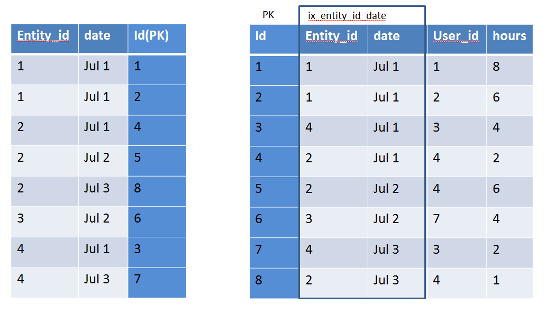
Here Index will be maintained in a dictionary with the specified columns + Primary key.
The values will be sorted based on the specified column order.

ix_multiple

Choosing columns is an Art
The columns should be chosen cleverly & defined in the particular order aiming the result.
The queries should also be build considering the index. If ignored, then index will also ignore us.

For example a Index  defined  for (col1,col2,col3)

@ Where  Condition

  • SELECT * FROM tbl_name WHERE col1 = val1  AND col2 = val2  AND col3 = val3; (INDEX USED)
  • SELECT * FROM tbl_name WHERE col1 = val1 AND col2 = val2; (INDEX USED)
  • SELECT * FROM tbl_name WHERE col1 = val1 (INDEX USED)
  • SELECT * FROM tbl_name WHERE col2 = val2; (INDEX NOT USED)
  • SELECT * FROM tbl_name WHERE col2 = val2 AND col3 = val3; (INDEX NOT USED)
  • SELECT * FROM tbl_name WHERE col1 = val1 AND col2 > val2; (INDEX USED)
  • SELECT * FROM tbl_name WHERE col1 > val1 AND col2 = val2; (INDEX NOT USED)
  • SELECT * FROM tbl_other JOIN tbl_name on tbl_other.col2 = tbl_name.col2; (INDEX NOT USED)
  • SELECT * FROM tbl_other JOIN tbl_name on tbl_other.col2 = tbl_name.col2 where tbl_name.col1 = val1(INDEX USED)

@ Group By

  • SELECT * FROM tbl_name group by col1, col2, col3; (INDEX USED)
  • SELECT * FROM tbl_name group by col1, col2; (INDEX USED)
  • SELECT * FROM tbl_name group by col1; (INDEX USED)
  • SELECT * FROM tbl_name group by col1, col2,col3,col4(INDEX NOT USED)
  • SELECT * FROM tbl_name group by col2, col3; (INDEX NOT USED)
  • SELECT DISTINCT col1, col2 FROM tbl_name; (INDEX USED)
  • SELECT col1, MIN(col2) FROM tbl_name GROUP BY col1; (INDEX USED)
  • SELECT col1, col2 FROM tbl_name WHERE col1 < const GROUP BY col1, col2; (INDEX USED)
  • SELECT MAX(col3), MIN(col3), col1, col2 FROM tbl_name WHERE col2 > const GROUP BY col1, col2; (INDEX USED)
  • SELECT * FROM tbl_name WHERE col1 < const GROUP BY col1, col2; (INDEX USED)
  • SELECT * FROM tbl_name WHERE col2 < const GROUP BY col1, col3; (INDEX NOT USED)
  • SELECT * FROM tbl_name WHERE col3 = const GROUP BY col1, col2; (INDEX USED)
  • SELECT * FROM tbl_name WHERE col1 = const GROUP BY col2, col3; (INDEX USED)
  • SELECT * FROM tbl_name WHERE col2 = const GROUP BY col1, col3; (INDEX USED)

@ Order By

  • SELECT * FROM tbl_name ORDER BY col1, col2, col3, … ; (INDEX USED)
  • SELECT * FROM tbl_name WHERE col1 = constant ORDER BY col2, col3; (INDEX USED)
  • SELECT * FROM tbl_name WHERE col1 = constant ORDER BY col3, col2; (INDEX NOT USED)
  • SELECT * FROM tbl_name ORDER BY col1, col2 ; (INDEX USED)
  • SELECT * FROM tbl_name ORDER BY col2, col3, … ; (INDEX NOT USED)
  • SELECT * FROM tbl_name ORDER BY col1, col3 (INDEX NOT USED)
  • SELECT * FROM tbl_name WHERE col2 = constant ORDER BY col1, col3; (INDEX USED)
  • SELECT * FROM tbl_name ORDER BY col1 DESC, col2 DESC; (INDEX USED)
  • SELECT * FROM tbl_name WHERE col1 = constant ORDER BY col2 DESC; (INDEX NOT USED)
  • SELECT * FROM tbl_name WHERE col1 = constant ORDER BY col1 DESC, col2 DESC; (INDEX USED)
  • SELECT * FROM tbl_name WHERE col1 > val1 ORDER BY col1 ASC; (INDEX USED)
  • SELECT * FROM tbl_name WHERE col1 < val1 ORDER BY col1 DESC; (INDEX USED)
  • SELECT * FROM tbl_name WHERE col1 = val1 AND col2 > val2 ORDER BY col2; (INDEX USED)


Factors to be considered in Multiple Index Column Order
Make sure the first column should not be used for range operations. In that case, further columns will have no effect.
From the above example: SELECT * FROM tbl_name WHERE col1 > val1 AND col2 = val2; (INDEX NOT USED)

Also use the columns first, whose filter results has less rows than filtering other rows.
For example, You want to filter a School students table by Subject and Class.
Select count(*) from students where subject = ‘ENGLISH’ and class=’IV’ ;
Let’s check each filter possible result count:
Select count(*) from students where subject = ‘ENGLISH’ ;
Result: 469
Select count(*) from students where class = ‘IV’ ;
Result: 29
So when we filter using class first, we will filter most of the records. Obviously, less scanning of records for further column(s) filter in index.
Thus the order of column index should be (class, subject)

Hope this helps to under the use of Multiple Column Index and also the factors to be considered in creating them.

Friday, July 25, 2014

Table Index – Part 1, Choosing the right column

Simple to say that Indexing is essential for filtering/sorting/grouping a table having more number of rows. But the real challenge is choosing the right column for index.
Before that, Let’s have a quick understand of Index  & how it is helpful in filtering the rows:
  • Index can be classified as Clustered Index & Non-Clustered/Secondary Index.
  • A Table will have only one Clustered Index, but can have multiple Secondary Index.
  • In MySQL, Primary Key is considered as a Clustered Index.
  • Rows are sorted & stored in the table based on this Clustered Index. The row values are stored closed to the Clustered Index column.
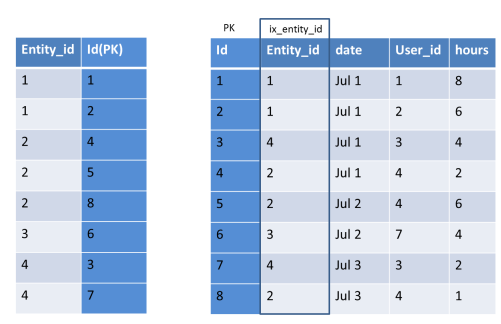
  • A Secondary Index will be maintained in a separate dictionary with that Indexed column (sorted) & the primary key column (to link the clustered index). If Primary Key index is long, secondary index use more space.
  • A example of Secondary Index :
    ix_img1
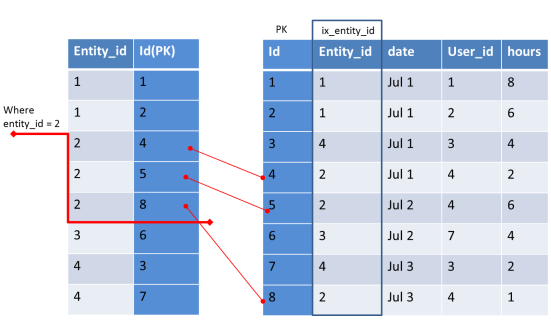
  • When we filter rows based on indexed column, instead of scanning all rows, only the needed rows will be scanned. (as the indexed values will be sorted)ix_img2
As it is clear there is a cost for creating index, we cannot simply create index for all the columns we use in WHERE clause.  Index affects the performance of Write Queries (Insert / Update / Delete) and it also consumes space in database.

 So selecting the right column is important.
In General, A column having more distinct values is good for Index.

 Rule of thumb :
Index Selectivity Formulae = (Count of distinct values/Number of Rows) * 100%
If Selectivity is > 8 % it can be considered for Index
In other simple words, when you filter a query by using an indexed column, you should get less than 15% of rows.

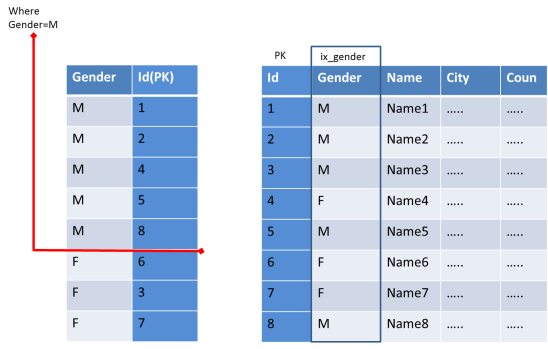
For example, if you need to filter an 10,000 records table based on Gender (the 2 distinct values will be Male / Female)
Selectivity = 2 / 10000 * 100% = 0.002% and so it should not be used for index.
ix_img3

As we can see cursor needs to scan more rows in the Index table & then map with the prime table. This has no advantage than scanning entire rows of the Primary table.
Also this selectivity formulae cannot be followed simply for all. We should consider the volume of data for each distinct value.

 For example, an Indian Ecommerce store having 500 customers from more than 50 countries. Based on our rule, it is eligible. But when you analyze the data, if 400 customers are from India alone, then there is no need for Index.

 So with selectivity formulae, you have to judge based on the possible volume of data.
In Part 2, We can see how to pick the columns for Multiple Column Index.

Monday, March 24, 2014

Webbrowser control drag drop Multiple Files

In WebBrowser control of .NET Winform, there is no drag & drop event. But we had a requirement to catch the dropped files. By using beforenavigate event, we can catch only one dropped file and not able to pick up all the dropped files.

The simple trick is to disable the Web browser control while dropping, so that the form dragdrop event will be fired, from where we can get all the files. But there is no disable property for Webbrowser control. To overcome that, place the webbrowser control inside a Panel & disable the panel, so that the webbrowser control will also be disabled.

Next question will be, When to disable the Panel control ?
Form Activate / Deactivate, since while we start dragging a file obviously the form will be deactivated & we can disable the Panel. On(after) drop, the form will be activated & can enable the Panel control.

The code is :
1. In Form1, placed the webbrowser control in the “Panel1″ panel control.
2. Applied the following code in your form


Private Sub Form1_Load(ByVal sender As System.Object, ByVal e As System.EventArgs) Handles MyBase.Load
     Me.AllowDrop = True
End Sub


Private Sub Form1_DragDrop(ByVal sender As System.Object, ByVal e As System.Windows.Forms.DragEventArgs) Handles Me.DragDrop
     Dim files() As String = e.Data.GetData(DataFormats.FileDrop)
     For Each filePath In files
          MsgBox(filePath)
     Next
End Sub


Private Sub Form1_DragEnter(ByVal sender As System.Object, ByVal e As System.Windows.Forms.DragEventArgs) Handles Me.DragEnter
     If e.Data.GetDataPresent(DataFormats.FileDrop) Then
          e.Effect = DragDropEffects.Copy
     End If
End Sub


Private Sub Form1_Activated(ByVal sender As Object, ByVal e As System.EventArgs) Handles Me.Activated
     ' To Enable Web Browser control
     Panel1.Enabled = True
End Sub


Private Sub Form1_Deactivate(ByVal sender As Object, ByVal e As System.EventArgs) Handles Me.Deactivate
     ' To Disable Web Browser control
     Panel1.Enabled = False
End Sub

Remove Windows 8 focus border

To remove the annoying focus border (not sure how it turned ON)

1. Go the Narrator Settings
2. Turn off "Highlight the Cursor" setting.

Wednesday, March 12, 2014

Come Fast my "CSS & JS"

A slow loading web page wastes the precious time of so many visitors. The loading speed of a website depends on several factors, of which loading CSS & JS files in a web page has a huge impact. Unfortunately developers used to miss, since in local development server we may not smell this but while in production remote server, it drags the loading time.  If few minutes we spent on optimizing the loading, it will save several minutes of several people.

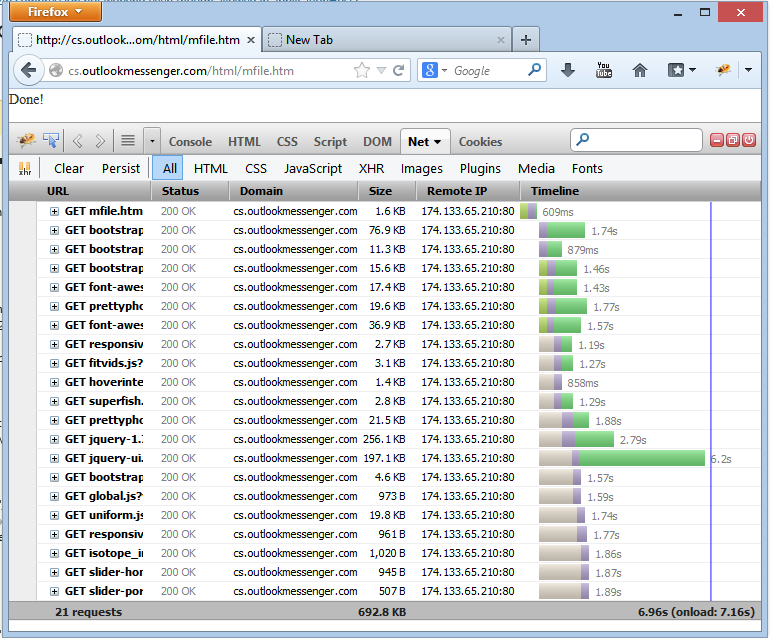
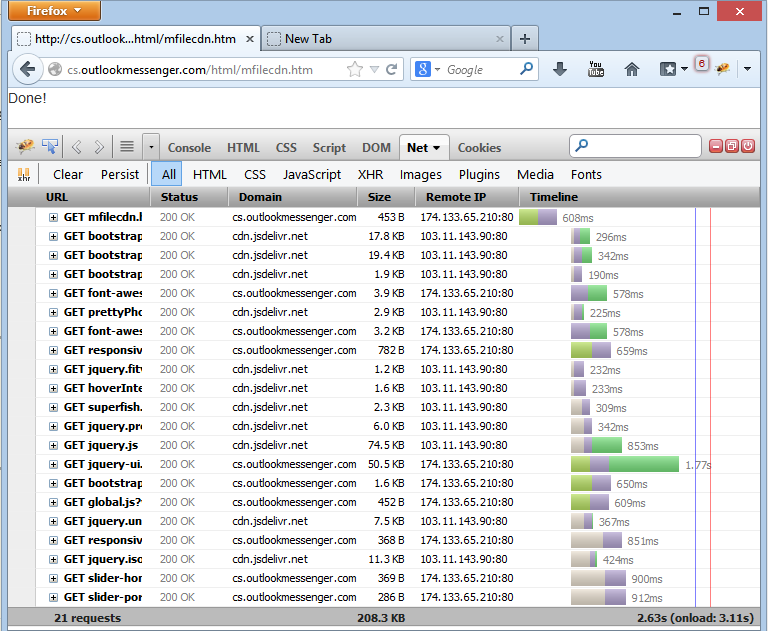
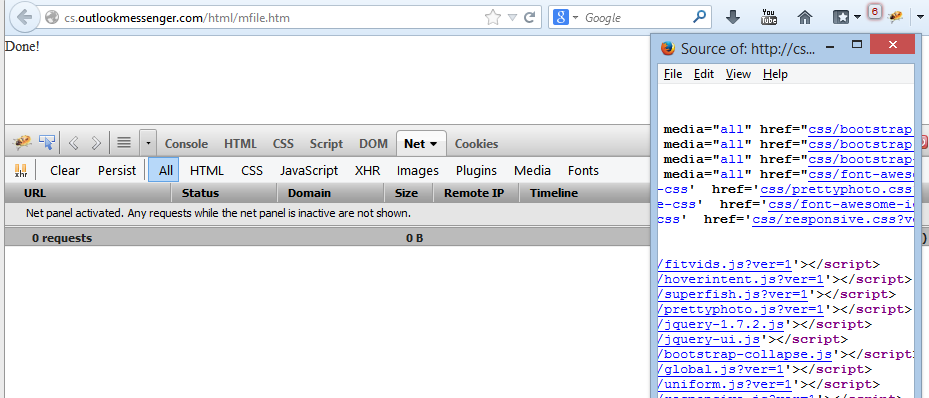
Let’s try how to optimize the loading time. From one of a website, taken the CSS & JS files & loaded in an empty html page.   We can see the loading time in Firebug
01_FullDownload1

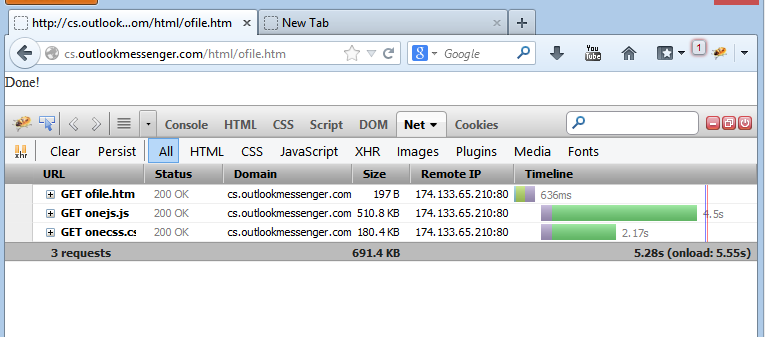
Nearly 20 CSS/JS files are used & it leads to 20 connection requests. Most browsers are supporting 6 concurrent connections per host & so there will be a six parallel downloading of files.  Rest files will be in waiting mode. That may be the reason for long loading time. To minimize that, let’s try by combining all the CSS & JS files in a single file. (To merge several css/js files into a single file, we can use server side scripting languages)
The result is
02_Merged2
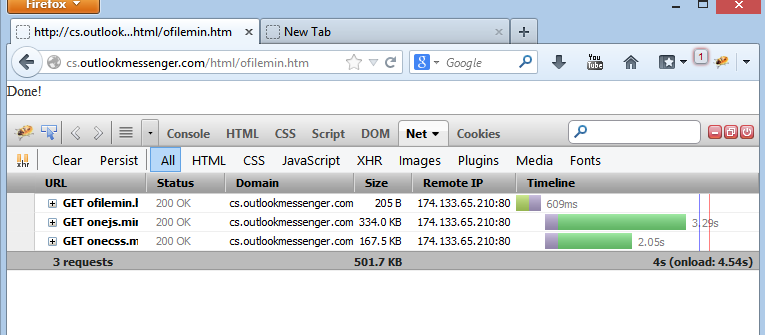
We were able to save some seconds. But still it is slow, may be due to the size of the content. To reduce the file content size, let’s minify both css & js.


03_MergedwithMin2
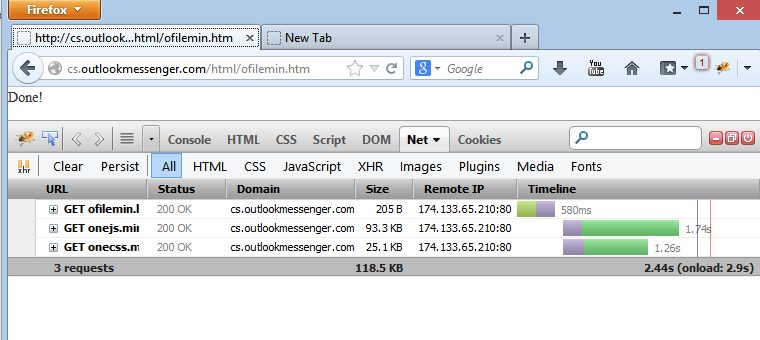
We have saved some file size & some seconds. But still slow, let’s try to compress further using gzip. We can do that in our web server. (Since we are using IIS, enabled “compression for static files” in IIS Manager).
Let’s refresh the browser & check

04_Gzip_MergedwithMin1
That’s better. We have saved nearly 4.5 seconds & also the bandwidth.

But while using as a merged single file, we may have other issue too. Of several files, there may be a frequent updating of a single file, which leads to a new version of entire merged file & it leads to download often, which ignores the browser cache advantage.
In such cases, hosting the static files in CDN (Content Delivery Network) servers is a better option. And also, linking files from multiple domains provide an advantage of parallel downloading. If we have 100 static files, we can host them in 4 different domains, like splitting the resources 25 per domain. We should not forget, linking multiple domains, will take some time for DNS lookup.  As a rule of thumb, make sure a domain serves at least 10 files.

Back to our case, let’s use a CDN server to download few files & check the download speed
05_MultiDomainCDN1
Yes, as expected it is saving the loading time.

Based on our project requirements, we should plan merging, compressing & hosting in other domains.

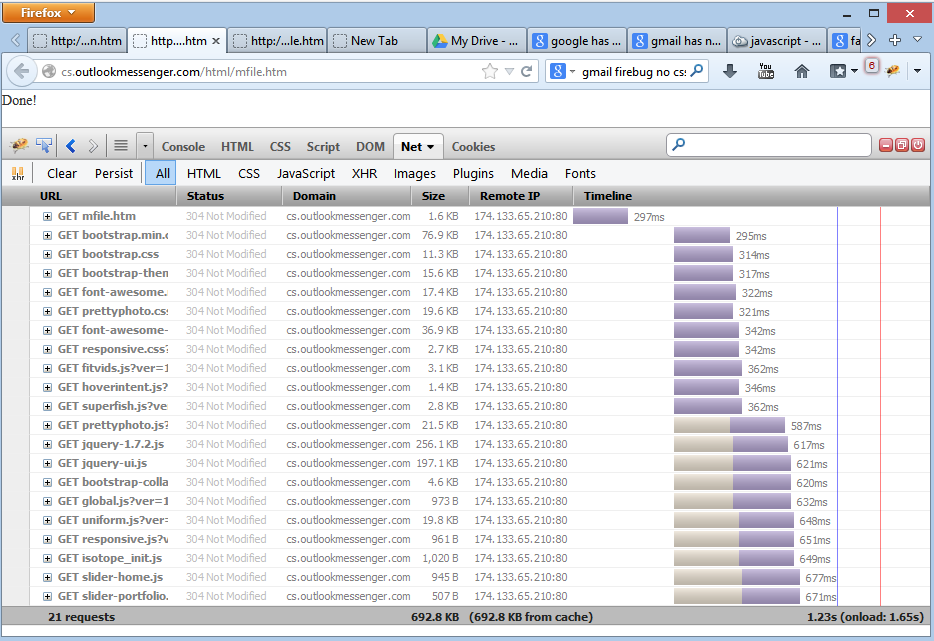
Now we are nearly done with initial page load. What happen, when the browser navigate to the next page?  Are the files will download again for each page or browser cache will rescue us. Let’s check.

06_FullwithBrowserCache
That’s great. Files were not downloaded again. For browser’s request, server returns 304 & so browser has used its cache.  Thus it takes nearly 1 second only for further pages. We are fast now.

But wait, why the browser connects & requests the server for each file on each page load? It is an overhead for both the browser & server. How to force the browser not to check with server for any update & just use its cache?  The solution is, we can set an expiry time of a file from server, so that browser will use that file directly from cache & not disturb the server.

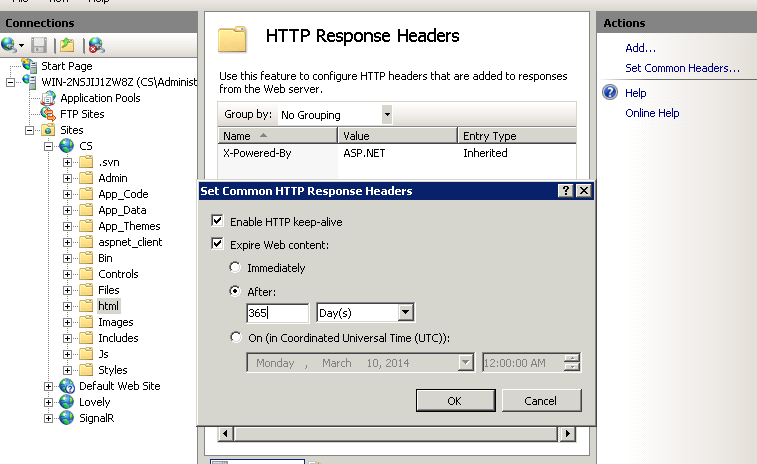
To set expiry details in header, in IIS manager:
We can set cache control by seconds or provide an exact expiry date.

07_Cache_IIS

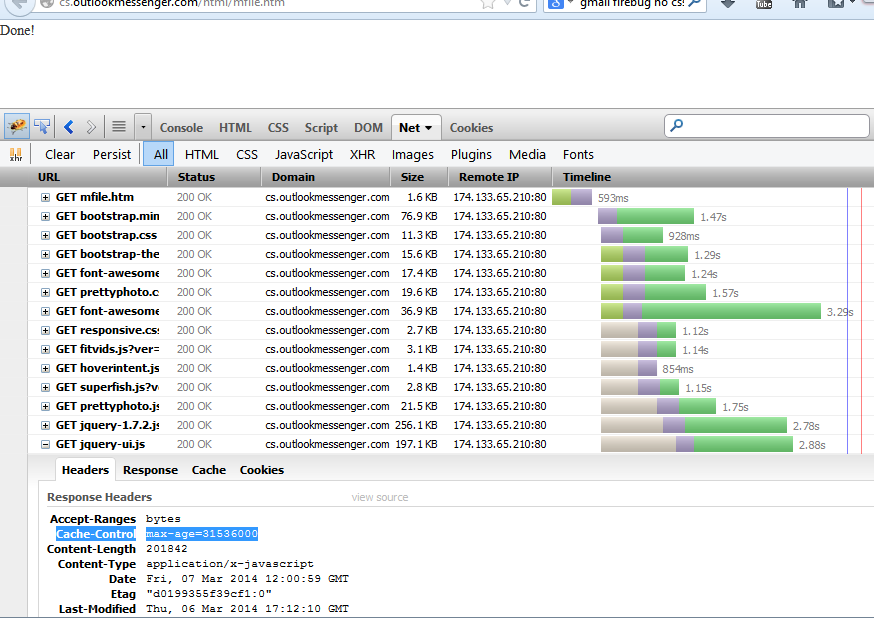
Now going to our browser & check by refresh.

07_FullwithBrowser_ServerCache1
On first load, we can see the page downloaded with headers for cache added.

Let’s check how cache works by navigating the same page again:

07_FullwithBrowser_ServerCache3

0 Seconds!!! No download or request from browser to server, but the entire content from cache.
Let’s appreciate our self & also make sure to apply needed optimization in future development.

Further few points to optimize for CSS/JS:
- Link all CSS files first, before JS files.
- Request static content files from a cookie-less domain
- If a piece of CSS/JS code for a particular page & no need of caching, better use inline code of the page.
- Partition JS into two files. Need to render at startup should be included in header & other JS after page loaded or load asynchronous.

Saturday, February 22, 2014

“Key” for Secure Data Transmission

“Secure” the most used word in communication world.  Most of our Private Office Instant Messenger enterprise customer’s prime question   “Is Our chat messages are encrypted  ?”. Let’s see the methods available in cryptography and the solutions used in many applications.

Symmetric Key Encryption:
In Symmetric Encryption, a single key is used for both encrypting & decrypting the message. To transform a message from one computer to other, both computers will have a same shared key. The sender will encrypt the data using that key and it is sent over the network to the other computer, where the encrypted packets will be decrypted using the same key.

Asymmetric Key (or Public Key) Encryption:
In Asymmetric Encryption, Pair of keys is used – Public & Private. The Sender will have a Public & Private key pair and the receiver will have a different Public & Private Key pair.  Public key is used to encrypt the data & private key is used to decrypt that encrypted data. Both Sender & Receiver share their Public Key, whereas the private key will remain as a secret key & is never exposed. The sender will encrypt the data using receiver’s Public Key and sent over the network to the receiver. The receiver by using private key, can decrypt that data.

When & What to Use :
Symmetric Key is mostly used to transmit the data in network, since it will be faster & simple for communication. BUT to manage the symmetric key between transmitting & receiving nodes Asymmetric key is used. For example, in our Output Messenger Server, all clients are connected under SSL. The same Web Server & Browser logic is followed here.
Secure Private Messenger
As per the above diagram, Server has Public-Private key pair, sends the public key to the client. Client generates a symmetric key & return to server by encrypting with Public Key.  Server decrypts the data using its Private key & stores the symmetric key for that client session. All further communication with the client are encrypted/decrypted using the symmetric key.

Algorithms:
For Asymmetric  RSA Algorithm (2048 bit) is the most common used Algorithm
For Symmetric  AES Algorithm (256/128 bit) is used in most applications.

Friday, October 18, 2013

WordPress Performance Analyzer

If you feel your WordPress website is very slow & you have tried all the cache/optimizer plugins, but not satisfied with the result.... here is the next important step

We all know WordPress is a well designed platform, but to add features we are installing more & more plugins. There are major chances that some plugins may slow down your site dramatically.

To analyze the plugin performance, there is a watchdog plugin to be installed

WordPress Plugin Performance Profiler
http://wordpress.org/plugins/p3-profiler/

You can easily scan & identify the misconfigured plugin.

Fix it & make your site fast as you!

Happy WordPressing !

Friday, January 25, 2013

Applications in Android / iPhone / iPad

Technology - the most changing thing in this universe. As an application development company, we are forced to grow with the technology to satisfy the customer requirements. Our first application was a Desktop Application, then entered Web & now Mobile Application.

We have released Outlook Messenger App for Android & iPhone/iPad. Initially Outlook Messenger was targeted as a LAN Messenger for internal communications. With Link Server Pro, now they are able to communicate with remote users through internet.

Outlook Messenger for  Android:
https://play.google.com/store/apps/details?id=srimax.outlookmessenger

Outlook Messenger for iPhone/iPad:
https://itunes.apple.com/us/app/omessenger/id582993443


Also, we have a released a small Free Travel Application in Android:
On My Trip
https://play.google.com/store/apps/details?id=srimax.TripSheet


Outlook Messenger

On My Trip

Tuesday, March 13, 2012

Outlook LAN Messenger Version 7

Mar 04, 2012 is a special day for Srimax , as we have released our new Outlook Messenger Version 7 (renamed as OMessenger). 
With Outlook Messenger V7, a new tool Link Server Pro is also released to power the Office communication.

While releasing Outlook Messenger Version 1.0 before 9 years, our target was to have a Simple & Server less Lan Chat Communication Tool. Later after 4 years, based on the customers request to chat in VPN/Multiple Subnetworks, released the Link Server Lite version. Now we have released Link Server Pro version, which can link users between LAN, VPN & Internet.

The special feature in Link Server Pro is the plugin support. You can extend the features of Link Server Pro to your business needs by using this plugin. We have developed & released plugins like Ombro - browser based version of Outlook Messenger, Live Support - Your website visitor can chat with your Outlook Instant Messenger Client etc.

We are still planning to add more features to make Outlook Messenger a vital tool for the growth of  its master's Organization. Communication is an important part for any business. Lets make it instant, simple & have a powerful result.

For more details on Outlook Messenger, please visit our website:

Developers who worked in this release are : Rajaguru, Anitha, Udhaya, Karthi & Palani.
New Website Design by: Mala, Viji

Saturday, November 26, 2011

Block USB Storage

To block USB Storage Devices in a Computer :

1. Login as Administrator
2. In Run, type Regedit
3. Get to this key
HKEY_LOCAL_MACHINE\SYSTEM\CurrentControlSet\Services\USBSTOR
Change the value of Start to 4. (default 3)

That's it.

Let's secure our computers!

Friday, November 25, 2011

Netgear issues with BSNL Dataone Broadband

I was unable to browse some websites, including yahoo.com through my Netgear DG834G ADSL2+ modem with BSNL Dataone Broadband connection.

The problem was due to WAN MTU Size. On changing the default MTU 1492 bytes to 1430 bytes, all websites started loading.

From Netgear:

Setting MTU size is a process of trial-and-error: start with the maximum value of 1500, then reduce the size until the problem goes away. Using one of these values is likely to solve problems caused by MTU size:

  • 1500. The largest Ethernet packet size; it is also the default value. This is the typical setting for non-PPPoE, non-VPN connections. The default value for NETGEAR routers, adapters and switches.
  • 1492. The size PPPoE prefers.
  • 1472. Maximum size to use for pinging. (Bigger packets are fragmented.)
  • 1468. The size DHCP prefers.
  • 1460. Usable by AOL if you don't have large email attachments, etc.
  • 1430. The size VPN and PPTP prefer.
  • 1400. Maximum size for AOL DSL.
  • 576. Typical value to connect to dial-up ISPs.

Happy Browsing

Tuesday, April 26, 2011

Grant User Rights to Start/Stop Windows Services

If you are an Administrator of Windows 2000/2003/xp operating system & need to grant rights for a user to Start/Stop an Windows Service, please follow the below steps.

1. Download & install Subinacl tool from microsoft

2. In Command Prompt,
SUBINACL /SERVICE [\\MachineName\]ServiceName /GRANT=[DomainName\]UserName[=Access]

where [\\MachineName\], [DomainName\] & [=Access] are optional

Example:
E:\Program Files\Windows Resource Kits\Tools>subinacl /service outlookmessengerLS /grant=xyzuser

outlookmessengerLS : new ace for xyzuser
outlookmessengerLS: 1 change(s)


Elapsed Time: 00 00:00:00
Done: 1, Modified 1, Failed 0, Syntax errors 0
Last Done : outlookmessengerLS

For more details:

Thursday, March 24, 2011

Stop Blue Screen 0x0000007E memory dump error

If you are experiencing Stop Error 0x0000007e (0xc0000005, 0x89c3e6e4, 0xb90d9a40, 0xb90d973c) regularly & exhausted on finding a solution try this :

Solution 1:
Try removing external cards(Sound Card, Network Card etc) of your mother board & check whether the issue is solved.
You can also try by uninstalling each Card driver.

Solution 2:
Any other conflicting/malfunctioning driver may also leads to this issue.
1. In Run, type sigverif & click Ok.
2. In Sigverif tool window, click Advanced, click Look for other files that are digitally not signed, click browse & select Windows\System32\Drivers folder, click Ok.
3. Run Start.
4. In the list of unsigned drivers, trace which are unknown & non essential drivers. Move the sys file to a backup folder. (Be careful, while moving the driver. Move only unsigned driver file)
5. Restart the system & make sure all are working normal without these drivers.

Solution 3:
Make sure you have sufficient hard disk space.

Done.


I Hope & Wish you will not get that Stop error again.

Long Live Windows!

Friday, January 7, 2011

MSSQL & Event ID: 17137

In Event Viewer > Application, If you have noticed Thousands of Events with details "Starting up database.." Event ID: 17137, here is the solution :

Make sure to set all the database in your SQL Server as Auto_Close=False. By default in SQL Server Express Editions, Auto_Close was set to True. If Auto_Close is true, SQL Server close the DB when the last connection is closed. So the databases were stopped & started regularly.

To Set Auto_Close = False
In SQL Server Manager > Right Click Database > Properties > Options, you can find the option.
OR
ALTER DATABASE SET AUTO_CLOSE OFF


Saturday, March 7, 2009

Thread Safe Dictionary Collection in VB.NET

Introduction
In Multi threaded application, it is essential to have thread safe collection. Provided below the SafeDictionary class built over Dictionary object.

Note: To iterate each item in collection, avoid "For each" loop & use "CopyTo", so that the collection values will be moved to another array & you can loop that array.

SafeDictionary.vb


Public Class SafeDictionary(Of TKey, TValue)
Implements IDictionary(Of TKey, TValue)
Private _rwLock As New Threading.ReaderWriterLockSlim
Private _dict As New Generic.Dictionary(Of TKey, TValue)

Private Class AcquireWriteLock
Implements IDisposable
Private _rwLock As New Threading.ReaderWriterLockSlim
Public Sub New(ByVal rwLock As Threading.ReaderWriterLockSlim)
_rwLock = rwLock
_rwLock.EnterWriteLock()
End Sub
Private disposedValue As Boolean = False ' To detect redundant calls

' IDisposable
Protected Overridable Sub Dispose(ByVal disposing As Boolean)
If Not Me.disposedValue Then
If disposing Then
' TODO: free other state (managed objects).
_rwLock.ExitWriteLock()
End If
' TODO: free your own state (unmanaged objects).
' TODO: set large fields to null.
End If
Me.disposedValue = True
End Sub
#Region " IDisposable Support "
' This code added by Visual Basic to correctly implement the disposable pattern.
Public Sub Dispose() Implements IDisposable.Dispose
' Do not change this code. Put cleanup code in Dispose(ByVal disposing As Boolean) above.
Dispose(True)
GC.SuppressFinalize(Me)
End Sub
#End Region
End Class
Private Class AcquireReadLock
Implements IDisposable
Private _rwLock As New Threading.ReaderWriterLockSlim
Public Sub New(ByVal rwLock As Threading.ReaderWriterLockSlim)
_rwLock = rwLock
_rwLock.EnterReadLock()
End Sub
Private disposedValue As Boolean = False ' To detect redundant calls

' IDisposable
Protected Overridable Sub Dispose(ByVal disposing As Boolean)
If Not Me.disposedValue Then
If disposing Then
' TODO: free other state (managed objects).
_rwLock.ExitReadLock()
End If
' TODO: free your own state (unmanaged objects).
' TODO: set large fields to null.
End If
Me.disposedValue = True
End Sub
#Region " IDisposable Support "
' This code added by Visual Basic to correctly implement the disposable pattern.
Public Sub Dispose() Implements IDisposable.Dispose
' Do not change this code. Put cleanup code in Dispose(ByVal disposing As Boolean) above.
Dispose(True)
GC.SuppressFinalize(Me)
End Sub
#End Region
End Class
Public Sub Add(ByVal item As System.Collections.Generic.KeyValuePair(Of TKey, TValue)) Implements System.Collections.Generic.ICollection(Of System.Collections.Generic.KeyValuePair(Of TKey, TValue)).Add
Using New AcquireWriteLock(_rwLock)
_dict(item.Key) = item.Value
End Using
End Sub
Public Sub Clear() Implements System.Collections.Generic.ICollection(Of System.Collections.Generic.KeyValuePair(Of TKey, TValue)).Clear
Using New AcquireWriteLock(_rwLock)
_dict.Clear()
End Using
End Sub
Public Function Contains(ByVal item As System.Collections.Generic.KeyValuePair(Of TKey, TValue)) As Boolean Implements System.Collections.Generic.ICollection(Of System.Collections.Generic.KeyValuePair(Of TKey, TValue)).Contains
Using New AcquireReadLock(_rwLock)
Return _dict.Contains(item)
End Using
End Function

Public Sub CopyTo(ByVal array() As System.Collections.Generic.KeyValuePair(Of TKey, TValue), ByVal arrayIndex As Integer) Implements System.Collections.Generic.ICollection(Of System.Collections.Generic.KeyValuePair(Of TKey, TValue)).CopyTo
Using New AcquireReadLock(_rwLock)
_dict.ToArray.CopyTo(array, arrayIndex)
End Using
End Sub

Public ReadOnly Property Count() As Integer Implements System.Collections.Generic.ICollection(Of System.Collections.Generic.KeyValuePair(Of TKey, TValue)).Count
Get
Using New AcquireReadLock(_rwLock)
Return _dict.Count
End Using
End Get
End Property
Public ReadOnly Property IsReadOnly() As Boolean Implements System.Collections.Generic.ICollection(Of System.Collections.Generic.KeyValuePair(Of TKey, TValue)).IsReadOnly
Get
Return False
End Get
End Property
Public Function Remove(ByVal item As System.Collections.Generic.KeyValuePair(Of TKey, TValue)) As Boolean Implements System.Collections.Generic.ICollection(Of System.Collections.Generic.KeyValuePair(Of TKey, TValue)).Remove
Using New AcquireWriteLock(_rwLock)
Return _dict.Remove(item.Key)
End Using
End Function

Public Sub Add(ByVal key As TKey, ByVal value As TValue) Implements System.Collections.Generic.IDictionary(Of TKey, TValue).Add
Using New AcquireWriteLock(_rwLock)
_dict(key) = value
End Using
End Sub

Public Function ContainsKey(ByVal key As TKey) As Boolean Implements System.Collections.Generic.IDictionary(Of TKey, TValue).ContainsKey
Using New AcquireReadLock(_rwLock)
Return _dict.ContainsKey(key)
End Using
End Function
Default Public Property Item(ByVal key As TKey) As TValue Implements System.Collections.Generic.IDictionary(Of TKey, TValue).Item
Get
Using New AcquireReadLock(_rwLock)
Return _dict(key)
End Using
End Get
Set(ByVal value As TValue)
Using New AcquireWriteLock(_rwLock)
_dict(key) = value
End Using
End Set
End Property
Public ReadOnly Property Keys() As System.Collections.Generic.ICollection(Of TKey) Implements System.Collections.Generic.IDictionary(Of TKey, TValue).Keys
Get
Using New AcquireReadLock(_rwLock)
Return _dict.Keys
End Using
End Get
End Property
Public Function Remove(ByVal key As TKey) As Boolean Implements System.Collections.Generic.IDictionary(Of TKey, TValue).Remove
Using New AcquireWriteLock(_rwLock)
Return _dict.Remove(key)
End Using
End Function

Public Function TryGetValue(ByVal key As TKey, ByRef value As TValue) As Boolean Implements System.Collections.Generic.IDictionary(Of TKey, TValue).TryGetValue
Using New AcquireReadLock(_rwLock)
Return _dict.TryGetValue(key, value)
End Using
End Function

Public ReadOnly Property Values() As System.Collections.Generic.ICollection(Of TValue) Implements System.Collections.Generic.IDictionary(Of TKey, TValue).Values
Get
Using New AcquireReadLock(_rwLock)
Return _dict.Values
End Using
End Get
End Property
Public Function GetEnumeratorGeneric() As System.Collections.Generic.IEnumerator(Of System.Collections.Generic.KeyValuePair(Of TKey, TValue)) Implements System.Collections.Generic.IEnumerable(Of System.Collections.Generic.KeyValuePair(Of TKey, TValue)).GetEnumerator
Using New AcquireReadLock(_rwLock)
Return _dict.GetEnumerator
End Using
End Function
Public Function GetEnumerator() As System.Collections.IEnumerator Implements System.Collections.IEnumerable.GetEnumerator
Using New AcquireReadLock(_rwLock)
Return _dict.GetEnumerator
End Using
End Function
End Class


Happy Coding!

Connecting Socks Proxy Server in VB.NET

Introduction
Using  Windows Socket we can connect to any destination via Socks Proxy. 

How it works:
Connecting without proxy:
1. Request Connection to DestinationServer:DestinationPort
2. Destination Connected 
3. Start Receiving/Sending Data to Destination

Connecting with proxy: 
1. Request Connection to ProxyServer:ProxyPort
2. If needed, provide Authentication Details for proxy server
3. ProxyServer connected
4. Passing our DestinationServer/port Details to Proxy Server
5. ProxyServer itself connects to the DestinationServer
6. Start Receiving/Sending Data to Destination

Code
Lets have 2 reusable class files for Proxy Connection

Proxy.vb
Public MustInherit Class Proxy
Private _server As String
Private _port As Integer
Private _user As String
Private _password As String
Public Property Server() As String
Get
Return _server
End Get
Set(ByVal value As String)
_server = value
End Set
End Property
Public Property Port() As Integer
Get
Return _port
End Get
Set(ByVal value As Integer)
_port = value
End Set
End Property
Public Property User() As String
Get
Return _user
End Get
Set(ByVal value As String)
_user = User
End Set
End Property
Public Property Password() As String
Get
Return _password
End Get
Set(ByVal value As String)
_password = Password
End Set
End Property
Public ReadOnly Property ProxyIPEndPoint() As IPEndPoint
Get
Return New IPEndPoint(Dns.GetHostEntry(_server).AddressList(0), _port)
End Get
End Property
Public Sub New(ByVal Server As String, ByVal Port As Integer, ByVal User As String, ByVal Password As String)
_server = Server
_port = Port
_user = User
_password = Password
End Sub

End Class

SocksProxy.vb
Imports System.Net.Sockets
Imports System.Net
Imports System.Text


Public Class SocksProxy
Inherits Proxy
Private _cSocket As Socket
Private _destHost As String
Private _destPort As String
Enum ProxyState
RequestAuthenticate
Authenticate
ConnectServer
Done
End Enum
Private sPxy As ProxyState
Private Const BUFFER_SIZE As Integer = 512
Private transferBuffer(BUFFER_SIZE) As Byte
Public Event Completed(ByVal sender As Object, ByVal e As SocketAsyncEventArgs)
Public Sub New(ByVal Server As String, ByVal Port As Integer, ByVal User As String, ByVal Password As String)
MyBase.New(Server, Port, User, Password)
End Sub
Public Sub New(ByVal p As Proxy)
MyBase.New(p.Server, p.Port, p.User, p.Password)
End Sub

Public Sub Connect(ByVal s As Socket, ByVal destHost As String, ByVal destPort As Integer)
Dim connectEventArgs As New SocketAsyncEventArgs
_destHost = destHost
_destPort = destPort
_cSocket = s
connectEventArgs.RemoteEndPoint = ProxyIPEndPoint
AddHandler connectEventArgs.Completed, AddressOf connectEventProxyArgs_Completed
_cSocket.ConnectAsync(connectEventArgs)
End Sub
#Region "SOCKS5 Proxy Functions"
Private Sub connectEventProxyArgs_Completed(ByVal sender As Object, ByVal e As SocketAsyncEventArgs)
If e.SocketError <> SocketError.Success Then
Throw New Exception(e.SocketError.ToString)
Return
End If

RemoveHandler e.Completed, AddressOf connectEventProxyArgs_Completed
AddHandler e.Completed, AddressOf receiveEventProxyArgs_Completed

e.SetBuffer(transferBuffer, 0, transferBuffer.Length)
_cSocket.ReceiveAsync(e)

sPxy = ProxyState.RequestAuthenticate
sendProxyData()
End Sub
Private Sub receiveEventProxyArgs_Completed(ByVal sender As Object, ByVal e As SocketAsyncEventArgs)
If e.SocketError <> SocketError.Success Then
Throw New Exception(e.SocketError.ToString)
Return
End If
Try
Dim bRec(e.BytesTransferred) As Byte
Buffer.BlockCopy(transferBuffer, e.Offset, bRec, 0, e.BytesTransferred)
Process_Proxy_Data(bRec, e)
If sPxy <> ProxyState.Done Then _cSocket.ReceiveAsync(e)
Catch ex As Exception
Throw New Exception(ex.Message)
End Try

End Sub
Private Sub sendProxyData()
Dim request(257) As Byte
Dim rawBytes() As Byte
Dim nIndex As UShort = 0
Try
Select Case sPxy
Case ProxyState.RequestAuthenticate
request(nIndex) = &H5 : nIndex += 1 ' Version 5.
If User <> "" Then 'only if provided
request(nIndex) = &H2 : nIndex += 1 ' 2 Authentication methods are in packet...
request(nIndex) = &H0 : nIndex += 1 ' NO AUTHENTICATION REQUIRED
request(nIndex) = &H2 : nIndex += 1 ' USERNAME/PASSWORD
Else
request(nIndex) = &H1 : nIndex += 1 ' 1 Authentication method in packet...
request(nIndex) = &H0 : nIndex += 1 ' NO AUTHENTICATION REQUIRED
End If
' Send the authentication negotiation request...
_cSocket.Send(request, nIndex, SocketFlags.None)
Case ProxyState.Authenticate
'Username/Password Authentication protocol
request(nIndex) = &H1 : nIndex += 1 ' Current version of the subnegotiation.
' add user name
request(nIndex) = CType(User.Length, Byte) : nIndex += 1
rawBytes = Encoding.Default.GetBytes(User)
rawBytes.CopyTo(request, nIndex)
nIndex += CType(rawBytes.Length, UShort)

' add password
request(nIndex) = CType(Password.Length, Byte) : nIndex += 1
rawBytes = Encoding.Default.GetBytes(Password)
rawBytes.CopyTo(request, nIndex)
nIndex += CType(rawBytes.Length, UShort)

' Send the Username/Password request
_cSocket.Send(request, nIndex, SocketFlags.None)
Case ProxyState.ConnectServer
Dim destIP As IPAddress = Nothing
Try
destIP = IPAddress.Parse(_destHost)
Catch ex As Exception
End Try
request(nIndex) = &H5 : nIndex += 1 ' version 5.
request(nIndex) = &H1 : nIndex += 1 ' command = connect.(connect=1; bind=2; UDP=3)
request(nIndex) = &H0 : nIndex += 1 ' Reserve = must be 0x00

If (Not destIP Is Nothing) Then
' Destination adress in an IP.
Select Case (destIP.AddressFamily)
Case AddressFamily.InterNetwork
' Address is IPV4 format(IP-V4=1; domain name=3; IP-V6=4)
request(nIndex) = &H1 : nIndex += 1
rawBytes = destIP.GetAddressBytes()
rawBytes.CopyTo(request, nIndex)
nIndex += CType(rawBytes.Length, UShort)
Case AddressFamily.InterNetworkV6
' Address is IPV6 format
request(nIndex) = &H4 : nIndex += 1
rawBytes = destIP.GetAddressBytes()
rawBytes.CopyTo(request, nIndex)
nIndex += CType(rawBytes.Length, UShort)
End Select
Else
' Dest. address is domain name.
request(nIndex) = &H3 : nIndex += 1 ' Address is full-qualified domain name.
request(nIndex) = Convert.ToByte(_destHost.Length) : nIndex += 1 ' length of addres_cSocket.
rawBytes = Encoding.Default.GetBytes(_destHost)
rawBytes.CopyTo(request, nIndex)
nIndex += CType(rawBytes.Length, Short)
End If
request(nIndex) = Convert.ToByte((_destPort And &HFF00) >> 8) : nIndex += 1
request(nIndex) = Convert.ToByte(_destPort And &HFF) : nIndex += 1
' send connect request.
_cSocket.Send(request, nIndex, SocketFlags.None)
End Select
Catch ex As Exception
Throw New Exception(ex.Message)
End Try
End Sub
Private Sub Process_Proxy_Data(ByVal pMessage() As Byte, ByVal e As SocketAsyncEventArgs)
If pMessage.Length < 2 Then Return
Dim response(257) As Byte

Dim nIndex As UShort = 0


Select Case sPxy
Case ProxyState.RequestAuthenticate
If pMessage(1) = &H0 Then
'No Authentication required
sPxy = ProxyState.ConnectServer
sendProxyData()
ElseIf pMessage(1) = &H2 Then
'Authentication required
sPxy = ProxyState.Authenticate
sendProxyData()
Else
Throw New Exception("None of the authentication method was accepted by proxy server.")
End If
Case ProxyState.Authenticate
If pMessage(1) = &H0 Then
'Authentication Success
sPxy = ProxyState.ConnectServer
sendProxyData()
Else
Throw New Exception("Bad Username/Password.")
End If
Case ProxyState.ConnectServer
If pMessage(1) = &H0 Then
'Connected
' Change the Handler to Regular Receive Event
RemoveHandler e.Completed, AddressOf receiveEventProxyArgs_Completed
sPxy = ProxyState.Done
RaiseEvent Completed(_cSocket, e)
Else
Throw New Exception("Unable to connect Proxy Server.")
End If
End Select
End Sub
#End Region
End Class

After including the above 2 class files, you can connect to a destination either directly or via proxy(if defined)
 Public Class MyClass
Private _cSocket As Socket

Public Function Connect() As Boolean
Dim server As String = "[destinationServer]"
Dim port As Integer ="[destinationPort]"
Dim clientproxy As Proxy = Nothing

clientproxy=new Proxy("[proxyServer]","[proxyPort]","[uname]","[pwd]")

_cSocket = New Socket(AddressFamily.InterNetwork, SocketType.Stream, ProtocolType.Tcp)
Dim connectEventArgs As New SocketAsyncEventArgs

If clientproxy Is Nothing Then
connectEventArgs.RemoteEndPoint = New IPEndPoint(Dns.GetHostEntry(server).AddressList(0), port)
AddHandler connectEventArgs.Completed, AddressOf connectEventArgs_Completed
_cSocket.ConnectAsync(connectEventArgs)
Else
socksProxy = New SocksProxy(clientproxy)
AddHandler socksProxy.Completed, AddressOf connectEventArgs_Completed
socksProxy.Connect(_cSocket, server, port)
End If
Return True

End Function

Private Sub connectEventArgs_Completed(ByVal sender As Object, ByVal e As SocketAsyncEventArgs)
If e.SocketError = SocketError.Success Then
RemoveHandler e.Completed, AddressOf connectEventArgs_Completed
ReceiveBegin()
End If
End Sub

Private Sub ReceiveBegin()
..........
..........

Hope it is simple. Happy Programming!

Wednesday, November 26, 2008

Extract ISO File

ISO File
Microsoft Visual Studio & their Service Packs releases can be installed either by their Online Installer or Offline Installer. For Offline Installer, the release will be mainly in *.iso extension & it is used to be burn in CD/DVD.
Instead of burning in DVD, we can view the iso contents using MagicDisc a freeware application.

Steps to do
1. Magic Disc
Download & Install MagicDisc Software

2. After Install,in MagicDisc systray menu, Click "Virtual CD/DVD-ROM" > Select a Drive Letter > Mount...

3. Select your ISO file & it will be mounted as a disc(virtual)

4. From this new drive, you can install/browse the iso contents. 
(And also useful for Gaming Applications too, without CD/DVD)

Thank you MagicISO, for your good software.

Happy Installation!


Sunday, November 16, 2008

Silverlight - Policy Server in VB.NET

Silver Light Policy Server
For Socket based communications in Silverlight, we need to run Policy Server at Socket Listening host. Policy Server will send the Policy XML file to silverlight client similar to flash crossdomain.xml file, which Silverlight also uses for its HTTP request. Without Policy Server, Silverlight sockets cannot connect to a Server Application.

Why we need a separate Policy file for sockets ?
The Crossdomain.xml file can be directly accessed by Clients using HTTP request from related web server, where as for sockets based communication server,  web server is not in the picture. So for security purposes, similar to crossdomain file, there needs a policy file to be downloaded & which will be issued by Policy Server.

Ports
Policy Server Listening Port: 943
Silverlight Sockets Allowed Ports: 4502 to 4534

How it will work ?
1. Our Policy Server listens in Port: 943. 
2. Silverlight client will connect to our policy server & send a request "<policy-file-request/>"
3. Once this request is received, Policy Server should send the Policy XML file in that connection & close that connection request.

Sample Policy XML File
clientaccesspolicy.xml

<?xml version="1.0" encoding="utf-8" ?>
<access-policy>
    <cross-domain-access>
        <policy>
            <allow-from>
                <domain uri="*" />
           </allow-from>
            <grant-to>
                <socket-resource port="4502-4534" protocol="tcp"/>
            </grant-to>
</policy>
   </cross-domain-access>
</access-policy>


domain uri - Allows the domain from where it can be called. "*" will allow all domains.
To allow only a particular domain Ex: uri="http://srimax.com"/>

Socket-Resource port can be used to indicate the allowed ports.
To allow only a particular port: port="4512" ...

Policy Server
PolicyServerService.vb


Imports System
Imports System.IO
Imports System.Net.Sockets
Imports System.Text

Public Class PolicyServerService

    Public sSocket As Socket
    Private PolicyFile As String = String.Empty
    Private Const POLICYREQUEST As String = "<policy-file-request/>"
    Private Const POLICYPORT As Integer = 943
    Private Const POLICYFILENAME As String = "clientaccesspolicy.xml" 

    Public Sub New()
        ' Read Policy File details
        PolicyFile = Path.GetDirectoryName(System.Reflection.Assembly.GetExecutingAssembly().Location) & "\" & POLICYFILENAME

        ' Establish the local endpoint for the socket.
        Dim ipLocal As New System.Net.IPEndPoint(System.Net.IPAddress.Any, POLICYPORT)
        sSocket = New Socket(AddressFamily.InterNetwork, SocketType.Stream, ProtocolType.Tcp)
        sSocket.SetSocketOption(SocketOptionLevel.Tcp, SocketOptionName.NoDelay, 0)
sSocket.Bind(ipLocal)

        sSocket.Listen(10)
        'Start an asynchronous socket to listen for connections.
        sSocket.BeginAccept(New AsyncCallback(AddressOf onConnect), Nothing)

    End Sub


    Private Sub onConnect(ByVal asyn As IAsyncResult)
        Dim objPolicyConnection As New PolicyConnection
        Try
            With objPolicyConnection
                .cSocket = sSocket.EndAccept(asyn)
                .cSocket.BeginReceive(.buffer, 0, .buffer.Length, SocketFlags.None, New AsyncCallback(AddressOf onDataArrival), objPolicyConnection)
            End With 

            'continue listen for connections.
            sSocket.BeginAccept(New AsyncCallback(AddressOf onConnect), Nothing)

        Catch exNull As System.NullReferenceException
        Catch ex As Exception
            Throw New Exception(ex.Message)
        End Try
    End Sub 

    Private Sub onDataArrival(ByVal asyn As IAsyncResult)
        Dim strData As String = String.Empty
        Dim policyFile As String = String.Empty
        Dim ibRead As Integer = 0
        Dim objPolicyConnection As PolicyConnection = CType(asyn.AsyncState, PolicyConnection)
        Try
            With objPolicyConnection
                If .cSocket.Connected Then ibRead = .cSocket.EndReceive(asyn)
                If ibRead > 0 Then
receivedText.Append(Encoding.ASCII.GetString(.buffer, 0, ibRead))
                strData = .receivedText.ToString()
                If strData.Length < POLICYREQUEST.Length Then
                    ' if not full request received
                    .cSocket.BeginReceive(.buffer, 0, .buffer.Length, SocketFlags.None, New AsyncCallback(AddressOf onDataArrival), objPolicyConnection)

                    Return
                End If
                If StringComparer.InvariantCultureIgnoreCase.Compare(strData, POLICYREQUEST) <> 0 Then
                    ' if not matching with Policy Request, then exit
                    .cSocket.Close()
                    Return
                End If

                'Sending Policy File
                .cSocket.BeginSendFile(policyFile, New AsyncCallback(AddressOf onSend), objPolicyConnection)
            End With

        Catch ex As Exception
            objPolicyConnection.cSocket.Close()
        End Try

    End Sub 

    Private Sub onSend(ByVal asyn As IAsyncResult)
        Dim objPolicyConnection As PolicyConnection = CType(asyn.AsyncState, PolicyConnection)
        ' Finish File Send & Close Connection since no further communication needed
        Try
            objPolicyConnection.cSocket.EndSendFile(asyn)
        Catch ex As Exception
        Finally
            objPolicyConnection.cSocket.Close()
        End Try
    End Sub
End Class

Public Class PolicyConnection
    Public cSocket As Socket
    Private Const POLICYREQUEST As String ="<policy-file-request/>"
    Public buffer(POLICYREQUEST.Length) As Byte
    Public receivedText As New StringBuilder
End Class

This Policy Server Service class can be called from our server application or can be a standalone PolicyServer application by just creating object.
Private objPolicyServer As PolicyServerService
Private Sub StartPolicyServer()
 objPolicyServer = New PolicyServerService()
End Sub


Download

The source code for the above can be downloaded from here

Conclusion
Thus we can have a stand-alone policy server or integerated policy server created in VB.NET.

Happy Silverlight Sockets Programming!