Friday, September 26, 2014

Tirunelveli to Mars

Sep 24th, 2014 a milestone of our India's space research organization, our spacecraft Mars orbiter (MOM) entered the Mars Orbit.

Some may think United States NASA has did this already in 1965 & is it really a achievement to do this now ? For them, Yes, this is our great & unique achievement.

The biggest achievement of ISRO is making the spacecraft with self-thinking brain. Mars orbiter can think & act on its own.

Our Satellite has travelled 680 million kms for about 300 days. Driving in proper route in space is interesting, as we know in space every thing around will look same. To stay on correct path, MOM used the star-gazer to look at positions of six to 10 stars for every microsecond and compare them with its preloaded patterns. Distant stars will be preferred as they are relatively stationary. By continuously matching the patterns, MOM determined its position & direction on its own. Even by travelling at a speed of more than 82,000 kmph, it never lost the direction.

While in travel, MOM automatically controls its temperature, position its antenna constantly towards earth for communication and its solar panels towards the sun to generate power. All these are done without any major input from earth.  Scientists call it autonomy.

To enter Mars orbit, our scientists from ISRO in Bangalore stored commands in MOM's brain 10 days in advance and Mars orbiter executed it perfectly.

This is just a start for future flying satellites. “Like migratory birds, satellites with autonomy can orbit Earth, look at the same things from different angles or look at different things and correlate data,“ says T.K.Alex  Indian Space Commission member. ISRO chairman K Radhakrishnan says this project is 80% technology demonstration.  Our ISRO has demonstrated the technology of autonomy in style to the universe.

Another information to feel us proud is, the Project Director of this mission is Mr.Subbiah Arunan, from Tirunelveli. It again proves our soil, water & air are filled with talent molecules. We are born in this land to achieve some thing.  If we have the confident, we will & can travel to any height!!


Mr. Subbiah Arunan, Project Director of MOM. He likes MGR & James Bond movies !!


Mars Orbiter Spacecraft captures its first image of Mars. Taken from a height of 7300 km; with 376 m spatial resolution


First image of the Earth by Mars Color Camera(MCC) of Mars orbiter spacecraft taken on Nov 19,2013 at 13:50 hrs (IST) from 67975 km altitude.
Friday, August 1, 2014

Table Index – Part 2, Multiple Column Index

In Part 1, we got some picture on choosing the column for index.
Here we are going to see the factors to be considered for Multicolumn index.

When to use Multiple Column Index ?
Consider a sales table with following columns:
id, company_id, sales_date, client_id , amount, remarks

If we filter the sales table based on any one field like
…from sales where company_id = 1;
…from sales where sales_date = ’2014-07-31′;
…from sales where client_id = 12 ;
it is better to have separate index for each field than multiple index.

But when multiple columns are used in filter like
…from sales where company_id = 1 and sales_date=’2014-07-31′;
…from sales where company_id = 1 and sales_date=’2014-07-31′ and client_id=12;

we should consider multiple column index than single column index for each field.
The index can be created as (company_id, sales_date, client_id)

One smart thing in multiple column index is, all the columns defined in index need not to be used in Filter column.
The index(company_id, sales_date, client_id) can support the following queries too
…from sales where company_id = 1
…from sales where company_id = 1 and sales_date=’2014-07-31′;


How Multiple Index are stored ?
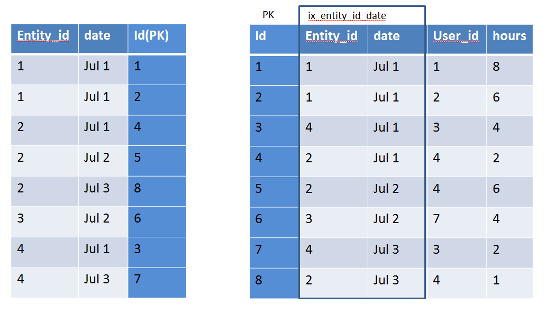
Here Index will be maintained in a dictionary with the specified columns + Primary key.
The values will be sorted based on the specified column order.

ix_multiple

Choosing columns is an Art
The columns should be chosen cleverly & defined in the particular order aiming the result.
The queries should also be build considering the index. If ignored, then index will also ignore us.

For example a Index  defined  for (col1,col2,col3)

@ Where  Condition

  • SELECT * FROM tbl_name WHERE col1 = val1  AND col2 = val2  AND col3 = val3; (INDEX USED)
  • SELECT * FROM tbl_name WHERE col1 = val1 AND col2 = val2; (INDEX USED)
  • SELECT * FROM tbl_name WHERE col1 = val1 (INDEX USED)
  • SELECT * FROM tbl_name WHERE col2 = val2; (INDEX NOT USED)
  • SELECT * FROM tbl_name WHERE col2 = val2 AND col3 = val3; (INDEX NOT USED)
  • SELECT * FROM tbl_name WHERE col1 = val1 AND col2 > val2; (INDEX USED)
  • SELECT * FROM tbl_name WHERE col1 > val1 AND col2 = val2; (INDEX NOT USED)
  • SELECT * FROM tbl_other JOIN tbl_name on tbl_other.col2 = tbl_name.col2; (INDEX NOT USED)
  • SELECT * FROM tbl_other JOIN tbl_name on tbl_other.col2 = tbl_name.col2 where tbl_name.col1 = val1; (INDEX USED)

@ Group By

  • SELECT * FROM tbl_name group by col1, col2, col3; (INDEX USED)
  • SELECT * FROM tbl_name group by col1, col2; (INDEX USED)
  • SELECT * FROM tbl_name group by col1; (INDEX USED)
  • SELECT * FROM tbl_name group by col1, col2,col3,col4; (INDEX NOT USED)
  • SELECT * FROM tbl_name group by col2, col3; (INDEX NOT USED)
  • SELECT DISTINCT col1, col2 FROM tbl_name; (INDEX USED)
  • SELECT col1, MIN(col2) FROM tbl_name GROUP BY col1; (INDEX USED)
  • SELECT col1, col2 FROM tbl_name WHERE col1 < const GROUP BY col1, col2; (INDEX USED)
  • SELECT MAX(col3), MIN(col3), col1, col2 FROM tbl_name WHERE col2 > const GROUP BY col1, col2; (INDEX USED)
  • SELECT * FROM tbl_name WHERE col1 < const GROUP BY col1, col2; (INDEX USED)
  • SELECT * FROM tbl_name WHERE col2 < const GROUP BY col1, col3; (INDEX NOT USED)
  • SELECT * FROM tbl_name WHERE col3 = const GROUP BY col1, col2; (INDEX USED)
  • SELECT * FROM tbl_name WHERE col1 = const GROUP BY col2, col3; (INDEX USED)
  • SELECT * FROM tbl_name WHERE col2 = const GROUP BY col1, col3; (INDEX USED)

@ Order By

  • SELECT * FROM tbl_name ORDER BY col1, col2, col3, … ; (INDEX USED)
  • SELECT * FROM tbl_name WHERE col1 = constant ORDER BY col2, col3; (INDEX USED)
  • SELECT * FROM tbl_name WHERE col1 = constant ORDER BY col3, col2; (INDEX NOT USED)
  • SELECT * FROM tbl_name ORDER BY col1, col2 ; (INDEX USED)
  • SELECT * FROM tbl_name ORDER BY col2, col3, … ; (INDEX NOT USED)
  • SELECT * FROM tbl_name ORDER BY col1, col3;  (INDEX NOT USED)
  • SELECT * FROM tbl_name WHERE col2 = constant ORDER BY col1, col3; (INDEX USED)
  • SELECT * FROM tbl_name ORDER BY col1 DESC, col2 DESC; (INDEX USED)
  • SELECT * FROM tbl_name WHERE col1 = constant ORDER BY col2 DESC; (INDEX NOT USED)
  • SELECT * FROM tbl_name WHERE col1 = constant ORDER BY col1 DESC, col2 DESC; (INDEX USED)
  • SELECT * FROM tbl_name WHERE col1 > val1 ORDER BY col1 ASC; (INDEX USED)
  • SELECT * FROM tbl_name WHERE col1 < val1 ORDER BY col1 DESC; (INDEX USED)
  • SELECT * FROM tbl_name WHERE col1 = val1 AND col2 > val2 ORDER BY col2; (INDEX USED)


Factors to be considered in Multiple Index Column Order
Make sure the first column should not be used for range operations. In that case, further columns will have no effect.
From the above example: SELECT * FROM tbl_name WHERE col1 > val1 AND col2 = val2; (INDEX NOT USED)

Also use the columns first, whose filter results has less rows than filtering other rows.
For example, You want to filter a School students table by Subject and Class.
Select count(*) from students where subject = ‘ENGLISH’ and class=’IV’ ;
Let’s check each filter possible result count:
Select count(*) from students where subject = ‘ENGLISH’ ;
Result: 469
Select count(*) from students where class = ‘IV’ ;
Result: 29
So when we filter using class first, we will filter most of the records. Obviously, less scanning of records for further column(s) filter in index.
Thus the order of column index should be (class, subject)

Hope this helps to under the use of Multiple Column Index and also the factors to be considered in creating them.

Friday, July 25, 2014

Table Index – Part 1, Choosing the right column

Simple to say that Indexing is essential for filtering/sorting/grouping a table having more number of rows. But the real challenge is choosing the right column for index.
Before that, Let’s have a quick understand of Index  & how it is helpful in filtering the rows:
  • Index can be classified as Clustered Index & Non-Clustered/Secondary Index.
  • A Table will have only one Clustered Index, but can have multiple Secondary Index.
  • In MySQL, Primary Key is considered as a Clustered Index.
  • Rows are sorted & stored in the table based on this Clustered Index. The row values are stored closed to the Clustered Index column.
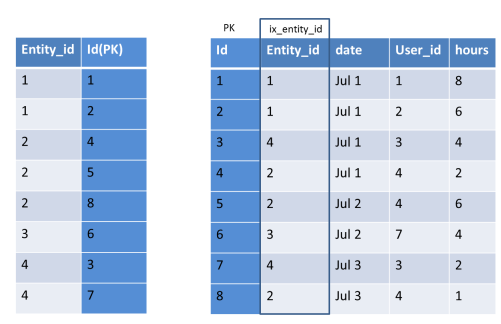
  • A Secondary Index will be maintained in a separate dictionary with that Indexed column (sorted) & the primary key column (to link the clustered index). If Primary Key index is long, secondary index use more space.
  • A example of Secondary Index :
    ix_img1
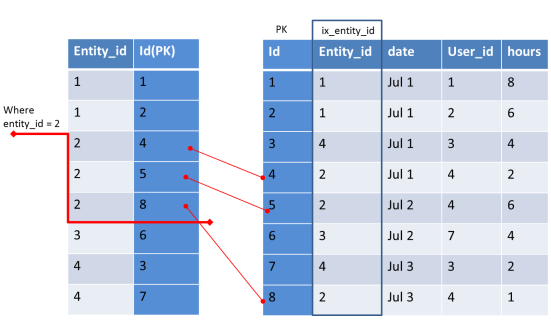
  • When we filter rows based on indexed column, instead of scanning all rows, only the needed rows will be scanned. (as the indexed values will be sorted)ix_img2
As it is clear there is a cost for creating index, we cannot simply create index for all the columns we use in WHERE clause.  Index affects the performance of Write Queries (Insert / Update / Delete) and it also consumes space in database.

 So selecting the right column is important.
In General, A column having more distinct values is good for Index.

 Rule of thumb :
Index Selectivity Formulae = (Count of distinct values/Number of Rows) * 100%
If Selectivity is > 8 % it can be considered for Index
In other simple words, when you filter a query by using an indexed column, you should get less than 15% of rows.

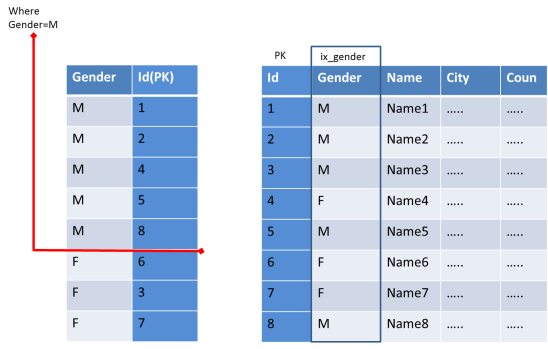
For example, if you need to filter an 10,000 records table based on Gender (the 2 distinct values will be Male / Female)
Selectivity = 2 / 10000 * 100% = 0.002% and so it should not be used for index.
ix_img3

As we can see cursor needs to scan more rows in the Index table & then map with the prime table. This has no advantage than scanning entire rows of the Primary table.
Also this selectivity formulae cannot be followed simply for all. We should consider the volume of data for each distinct value.

 For example, an Indian Ecommerce store having 500 customers from more than 50 countries. Based on our rule, it is eligible. But when you analyze the data, if 400 customers are from India alone, then there is no need for Index.

 So with selectivity formulae, you have to judge based on the possible volume of data.
In Part 2, We can see how to pick the columns for Multiple Column Index.